Leadpages pricing includes subscription options for Leadpages and HTML Pub, with both monthly and annual billing available.
Compare each plan’s price, features, usage limits, and available discounts to see which option matches your business needs and budget.
Leadpages Pricing Plans: How Much Does It Cost In 2026?

The table below compares the latest Leadpages pricing for monthly and annual billing to help you choose the plan that fits your budget and business needs.
| Product | Plan | Monthly Price | Annual Price (Save 20%) | Recommended For |
|---|---|---|---|---|
| HTML Pub | Starter | $10/month | ~$96/year | Individuals managing one website with a single custom domain |
| HTML Pub | Pro | $29/month | ~$278/year | Creators and freelancers publishing content with AI-powered tools |
| HTML Pub | Business | $49/month | ~$470/year | Small teams publishing across multiple projects |
| Leadpages | Grow | $99/month (First month $49) | $948/year (~$79/month) | Small businesses and solo marketers focused on lead generation |
| Leadpages | Optimize | $199/month (First month $99) | $1,908/year (~$159/month) | Growing businesses running A/B testing and conversion optimization |
| Leadpages | Scale | $399/month | $3,828/year (~$319/month) | Agencies, large marketing teams, and enterprise organizations |
HTML Pub vs. Leadpages: What’s The Difference?
HTML Pub and Leadpages run on the same platform, but Leadpages offers a broader set of conversion and optimization tools.
HTML Pub covers the core tools for website publishing, landing pages, blogs, custom domains, SSL, and an AI editor. It suits users who need the essentials for building and managing an online presence.
Leadpages includes all HTML Pub features and adds advanced tools such as A/B testing, Smart Traffic, heatmaps, lead enrichment, and AI-powered personalization. These features give businesses more options for testing pages, understanding visitor behavior, and improving conversions.
You can also upgrade from HTML Pub to Leadpages without rebuilding your website. Your pages, blogs, and custom domains remain connected to your account, so you can add more advanced optimization features as your needs grow.
Next, let’s compare the Leadpages pricing plans, including their features, benefits, and the type of user each plan suits best.
HTML Pub Pricing
| Feature | Starter | Pro | Business |
|---|---|---|---|
| Monthly Price | $10 | $29 | $49 |
| Published Pages | 5 | 25 | 50 |
| Custom Domains + SSL | 1 | 1 | 2 |
| Blogs | – | 1 | 2 |
| Asset Storage | – | 5 GB | 5 GB+ |
| Analytics History | – | 90 days | 12 months |
| AI Credits / Month | 4,000 | 12,000 | 20,000 |
| Custom URL Slugs | – | ✓ | ✓ |
| API Access | – | ✓ | ✓ |
| MCP Connector | – | ✓ | ✓ |
Starter Plan – $10/month
Starter is the lowest-priced HTML Pub plan. It includes 5 published pages, 1 custom domain with SSL, and 4,000 AI credits per month, making it suitable for launching a small website or landing pages.
Pro Plan – $29/month
Pro expands the limits with 25 published pages, 1 blog, 5 GB of asset storage, 90 days of analytics history, 12,000 AI credits per month, custom URL slugs, API access, and an MCP connector for AI-assisted publishing.
Business Plan – $49/month
Business includes 50 published pages, 2 custom domains, 2 blogs, 12 months of analytics, 20,000 AI credits, API access, and the MCP connector.
Choose this plan if you need higher publishing limits without Leadpages’ A/B testing, Smart Traffic, or heatmaps.
Leadpages Pricing
| Feature | Grow | Optimize | Scale |
|---|---|---|---|
| Monthly Price | $99 | $199 | $399 |
| Published Pages | Unlimited | Unlimited | Unlimited |
| Custom Domains | 4 | 6 | 10 |
| Blogs | 3 | 5 | 10 |
| Brand Kits | 3 | 5 | 10 |
| Asset Storage | 15 GB | 25 GB | 50 GB |
| Team Seats | 1 | 3 | 10 |
| A/B Testing | ✓ | ✓ | ✓ |
| Variants per Test | 2 | 4 | 4 |
| Smart Traffic | – | ✓ | ✓ |
| Heatmaps | – | ✓ | ✓ |
| AI Personalization | – | ✓ | ✓ |
| Insights Dashboard | – | ✓ | ✓ |
| Performance Alerts | – | ✓ | ✓ |
| Automatic Optimization | – | – | ✓ |
| IP Enrichment / Month | 2,000 | 5,000 | 10,000 |
| Lead Enrichment / Month | 1,000 | 2,500 | 5,000 |
| AI Credits / Month | 40,000 | 80,000 | 160,000 |
| Analytics History | 12 months | 24 months | 36 months |
| Sync Speed | Standard | Faster | Real-time |
| Active Integrations | 5 | 10 | 25 |
| Workspaces | – | – | ✓ |
| Audit Logs | – | – | ✓ |
| Support | Standard | Priority Email | Dedicated Customer Success Manager |

Grow Plan – $99/month
Grow includes unlimited pages, 4 custom domains, 3 blogs, manual A/B testing, 15 GB storage, and 40,000 AI credits per month. It suits businesses that need core landing page and conversion tools.
Optimize Plan – $199/month
Optimize includes every Grow feature plus Smart Traffic, heatmaps, AI-powered personalization, performance insights, and alerts. It also increases storage, team seats, analytics history, and AI credits.
Scale Plan – $399/month
Scale includes every Optimize feature and adds automatic optimization, workspaces, audit logs, real-time sync, and a dedicated Customer Success Manager. It also provides the highest limits for domains, integrations, storage, and team members.
Leadpages AI Credits Explained
Every Leadpages plan includes monthly AI credits. Grow includes 40,000 credits, Optimize includes 80,000 credits, and Scale includes 160,000 credits.
You can use these credits for AI page generation, URL imports, and AI chat. Credits reset every billing cycle, while purchased top-ups never expire.
| AI Credit Pack | Price | Cost per Credit |
|---|---|---|
| 2,000 Credits | $2.50 | $0.00125 |
| 5,000 Credits | $5.00 | $0.00100 |
| 15,000 Credits | $12.00 | $0.00080 |
| 50,000 Credits | $35.00 | $0.00070 |
| 150,000 Credits | $90.00 | $0.00060 |
Larger credit packs cost less per credit, making them a better value if you use Leadpages AI features regularly.
What Payment Options Are Available On Leadpages?
Leadpages makes it easy to pay for your subscription with multiple secure payment options.
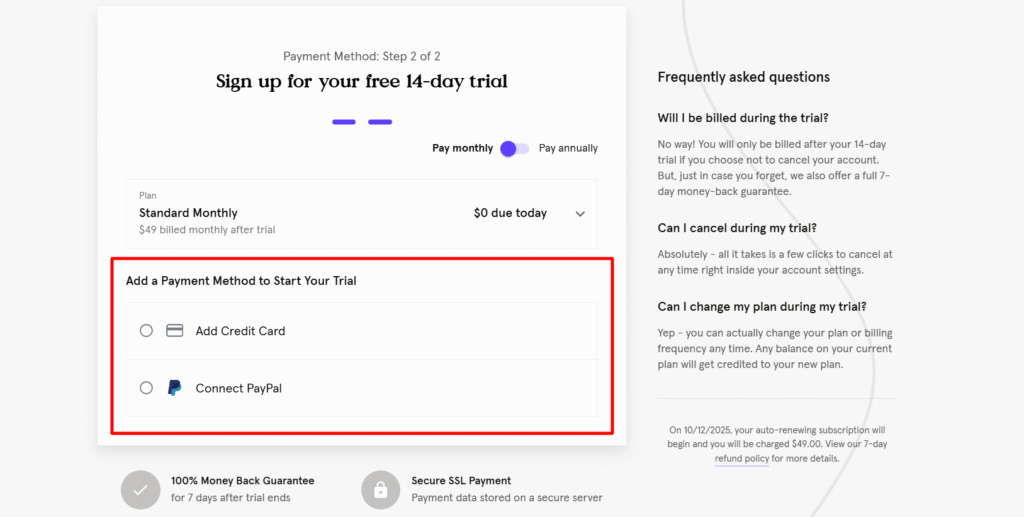
Here’s what you can use:
- Credit & Debit Cards – Major cards like Visa, MasterCard, American Express, and Discover are accepted.
- PayPal – Pay quickly using your PayPal account for added convenience and security.
- Annual or Monthly Billing – Choose to pay monthly or annually. Annual plans usually save you more with discounted pricing.
- Automatic Renewal – Subscriptions automatically renew using your selected payment method, ensuring uninterrupted access.
Tip: Make sure your payment details are up to date to avoid service interruptions, especially if you’re signing up during seasonal sales like Black Friday or Cyber Monday.
What Is The Refund Policy For Leadpages?
Leadpages offers a 7-day money-back guarantee on your first paid subscription. The 7-day period starts when your first payment is charged after the free trial.
Key points to know:
- You can request a full refund within 7 days of your first paid subscription payment.
- Contact Leadpages support to request the refund within the 7-day period.
- After 7 days, Leadpages does not offer prorated refunds for the unused portion of your billing cycle.
- After canceling, you can continue using Leadpages until the end of your current paid billing period.
In short, Leadpages gives you a risk-free way to try out their platform, ensuring you only pay if it truly fits your needs.
Does Leadpages Offer A Free Trial?
Yes. Leadpages offers a 14-day free trial for new users, allowing you to explore the platform before purchasing a paid plan.
During the trial, you can access key features, including:
- Drag-and-drop landing page builder
- Pop-ups and alert bars
- 250+ landing page templates
- Lead capture forms and integrations
- Landing page publishing and performance tracking
The free trial lets you build and test landing pages, collect leads, and evaluate the platform before your subscription begins.
Once you’re ready to subscribe, check the latest Leadpages discount code to lower your subscription cost.
What Are The Other Ways To Save More On Leadpages?
Here’s how you can maximize your savings on a Leadpages pricing plan:
- Choose annual billing: Annual plans cost less per month than monthly plans and offer better overall value.
- Use running discounts: Leadpages often runs regular promotions; right now, you can save up to 25% on selected plans.
- Take Advantage of Black Friday & Cyber Monday Deals: Black Friday & Cyber Monday sales often feature exclusive discounts and bundles, making it the perfect time to upgrade your plan.
Is Leadpages Worth The Money?
Yes, Leadpages is worth the money if you need a no-code platform to build landing pages, websites, and lead capture campaigns.
Leadpages includes a drag-and-drop builder, customizable templates, pop-ups, alert bars, forms, and A/B testing.
These tools cover the main requirements for creating and optimizing landing pages without custom development.
If you need custom designs or complex branding, a professional designer can provide more flexibility.
If you’re comparing other platforms before subscribing, our Leadpages alternatives article compares landing page builders by pricing, features, and overall value.
Leadpages is a practical option for small businesses, marketers, and entrepreneurs who want to build and optimize landing pages without coding.
Conclusion
The choice between HTML Pub and Leadpages depends on what you want to build and the tools your business needs.
HTML Pub works well for publishing websites, blogs, and landing pages, while Leadpages is a better option for businesses focused on conversions and optimization.
Leadpages stands out with tools such as A/B testing, Smart Traffic, heatmaps, lead enrichment, and AI-powered personalization.
If conversion performance is a key goal, these features can make the higher-tier plans more useful.
You can also save 20% with annual billing, making it a more cost-effective option for long-term use.
Before choosing a plan, compare the pricing, features, usage limits, and optimization tools to find the right fit for your business.
FAQs On Leadpages Pricing
How Much Does Leadpages Cost Per Month?
Leadpages pricing starts at $10/month for HTML Pub Starter and $99/month for the Leadpages Grow plan. Plans include website and landing page publishing, with higher tiers adding A/B testing, Smart Traffic, heatmaps, and AI-powered personalization. Annual billing saves 20% on every plan.
How Much Does Leadpages Annual Billing Save?
Annual billing saves 20% on every Leadpages plan. That equals $240 per year on Grow, $480 per year on Optimize, and $960 per year on Scale compared with paying monthly.
Can I Change Leadpages Plans Or Cancel?
Yes. You can upgrade, downgrade, or cancel your Leadpages plan at any time. Plan changes apply at the next billing cycle, and you can manage your subscription from your account settings.